Delete your Arcnova account
You can permanently delete your Arcnova account and the personal information associated with it at any time. This page explains how — directly in the app, or by emailing us if you no longer have access to it.
App: Arcnova (interactive fiction) · Developer: Shenzhen Miquan Technology Co., Ltd. · Last updated: May 1, 2026
Method 1 — Delete from inside the app
The fastest way is to delete your account directly from within the Arcnova app. No email or support request is needed.
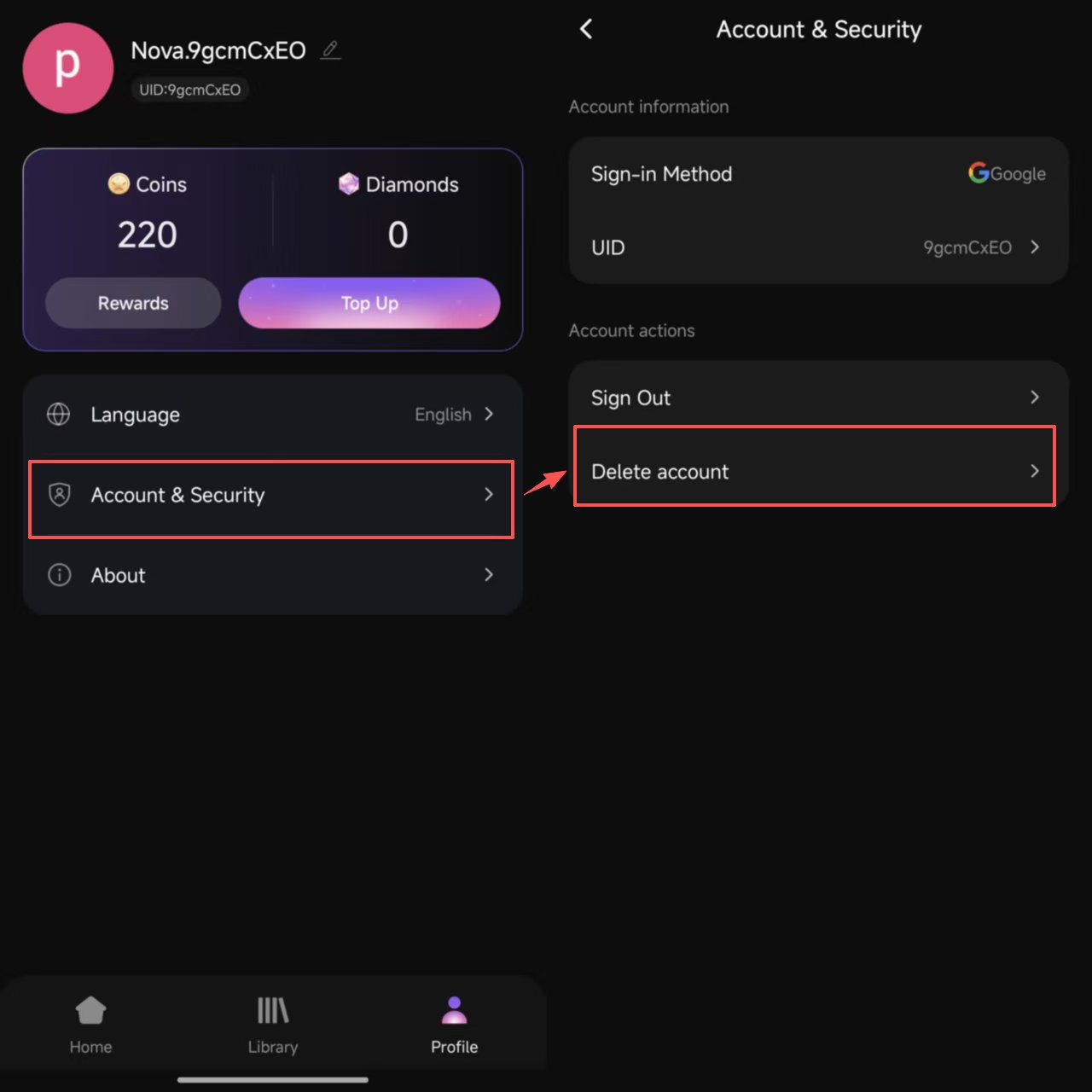
Launch Arcnova and tap the Profile icon in the bottom navigation bar.
On the Profile page, find and tap the Account & Security row.
Under Account actions, tap Delete account and follow the on-screen confirmation to complete the deletion.
Method 2 — Request deletion by email
If you have already uninstalled the app, lost access to your sign-in account, or are unable to use the in-app option for any other reason, you can request account deletion by email.
Send us a deletion request
Email hellotimes2026@gmail.com with the subject line "Arcnova Account Deletion Request". To help us locate your account quickly, please include:
- The sign-in method you used (Google, Apple, or X)
- The email address associated with that account
- Your in-app UID, if known (visible under Profile → Account & Security)
We may ask you to verify your identity before processing the request. Once verified, we will delete your account within a reasonable period, typically within 14 days.
What gets deleted
When your account is deleted, we delete or anonymize the personal information associated with it within a reasonable period. Some records must be kept longer for legal and regulatory reasons.
Removed
- Third-party login identifier, nickname, profile picture, email
- Reading progress, story choices, library, bookmarks
- Remaining Coins, Diamonds, and unused virtual items (voided upon deletion, subject to any refund separately approved under the Refund Policy)
- In-app preferences and personalization data
- Customer support correspondence linked to the account
Retained
- Transaction records (order numbers, amounts, timestamps, payment-platform receipts) — retained for at least 7 years for tax, audit, and dispute-resolution purposes, or longer where required by law
- Data we are otherwise required by law to retain
Full details on data handling are in our Privacy Policy, particularly Section 5 — Data Retention.
Before you delete — things to consider
- Recent purchases: deleting your account will void any remaining balance. Account deletion does not itself create a right to a refund; eligibility remains subject to the original payment provider, applicable law, and the Refund Policy.
- Refund requests follow the original purchase channel: Apple App Store, Google Play, or Paddle web checkout. Deleting your account does not initiate, cancel, or approve a refund. Submit any request before deletion and keep the receipt and request confirmation.
- You cannot recover the account after deletion. Signing in again with the same Google / Apple / X account will create a brand new account with no history, balance, or progress.